

On this page
Turn on the Focus Pad MCP server in DevWorkspace Pro, and your AI agent can add a task with a deadline and Pesky reminders that nag you until you complete it.
You ship a migration at 14:00. The agent says: "Check the error rate in production in about two hours." You agree. At 18:30 you remember.
Agents are good at telling you what to do later. They are bad at making sure you do it, because a chat message cannot tap you on the shoulder.
With the Focus Pad MCP server, the agent can. You say "remind me", and it adds a task with a deadline and a repeating desktop reminder. The reminder comes back at the interval it set until the task is done.
In short
- The agent adds a Focus Pad task with
due(deadline) andpesky(reminder interval in minutes). - Pesky shows a desktop notification at that interval until you complete the task.
- The agent reads your local time from Focus Pad, so "in 2 hours" and "Friday 5 pm" work without time zone math.
- It all runs on your computer. The server listens on
127.0.0.1only.
How it works
Focus Pad tasks can have four fields. The agent can set all of them through the add_item and update_item tools.
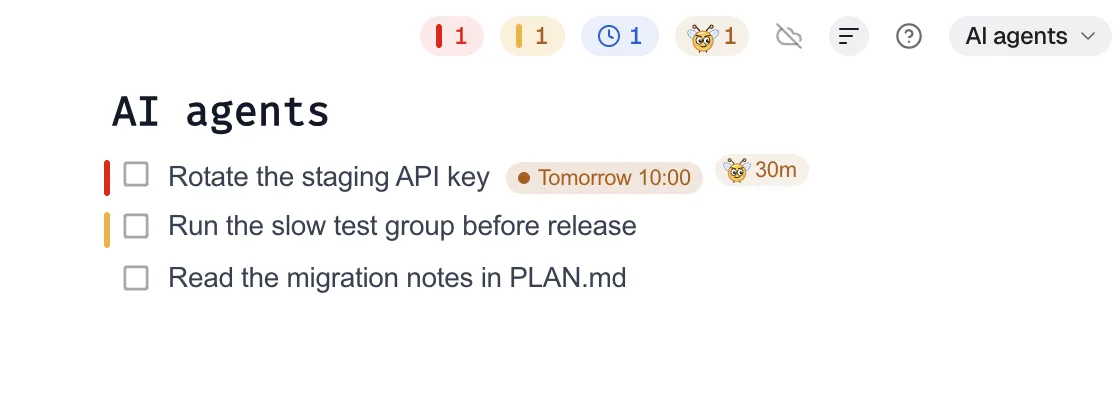
| Field | What the agent sends | What you see |
|---|---|---|
due |
Local time, for example 2026-10-14T1600 |
A label: grey, then amber (24 hours or less), then red (overdue) |
pesky |
Minutes, 1 to 1440 | A desktop notification at that interval, until done |
priority |
0 to 5 | Priority bars on the task |
color |
red, orange, brown, green, teal, blue, purple, magenta |
A colored task |
A deadline tells you when. Pesky makes sure you do not forget. The deadline label alone does not send a notification, so for anything you must not miss, ask for both.
Set it up once
- In DevWorkspace Pro, open Preferences → Focus Pad.
- In MCP server for AI agents, turn on the switch and click Save.
- Click the copy icon next to Connect Claude Code and run the command in a terminal.
claude mcp add --transport http --scope user dwp-focuspad http://127.0.0.1:47821/mcp --header "Authorization: Bearer <token>"
The app fills in your token and port. In Claude Code, /mcp lists dwp-focuspad as connected. Other clients that support Streamable HTTP with a custom header can use the values in the Focus Pad MCP docs.
Five reminders worth handing to your agent
1. Check production after a deploy
It is 14:00. Add "Check error rate on prod after the invoices migration" to Focus Pad, due today 16:00, priority 5, color red, and nudge me at 16:00.
The agent calls list_collections to find the right collection, then add_item with due, priority, color and pesky: 120. Pesky counts from the moment it is set, so the first notification comes at 16:00, then every 120 minutes until you complete the task. Want faster nudges after the first one? Ask the agent to change the interval with update_item.
2. "Remind me in 2 hours"
Remind me in 2 hours to reply to the PR review from Ana.
The agent does not guess the time. list_items and list_collections return your local time, so the agent adds two hours and sends the result as due. Ask it to add a Pesky interval too if you want a notification.
Pesky counts from the moment it is set, not from the deadline. So for a nudge in 2 hours, the agent sends pesky: 120. The first notification comes at the deadline, then every 120 minutes until you complete the task.
3. Turn a blocker into something you cannot ignore
The release is blocked on the Stripe webhook secret. Make that task priority 5 and nag me every 30 minutes.
If the task already exists, the agent uses update_item. It sends the task's position and current text, so it does not change the wrong task if you moved things around.
4. A gentle daily one
Add "Update the changelog" due Friday 17:00, Pesky every 240 minutes.
Not every reminder needs to be loud. A long interval keeps the task in view without breaking your focus. This is the one case where Pesky before the due day is on purpose: a slow nudge for a task you tend to put off. You can set any interval from 1 minute to 24 hours.
5. Let the agent clean up when you are done
I checked prod, all good.
Tell the agent and it completes the task with delete_item. The task leaves the list and Pesky stops. You can also complete it yourself with ⌘ + click (Ctrl + click on Windows and Linux).
Time the first nudge, do not just set it
This is the mistake to avoid. If the agent sets pesky: 30 on a task due on Friday, you get a notification every 30 minutes from now until Friday. That is noise, and you will learn to ignore it.
The founder's own Secretary agent made this mistake early on, and now follows two rules:
- Due today: set Pesky to the minutes until the moment you want the first nudge.
- Due on a later day: set only the deadline. Add Pesky with
update_itemon the day.
Make it a standing rule
You do not need to ask each time. Put a rule in your CLAUDE.md:
## Reminders

When a step needs me to do something by hand later (check production, reply to
someone, rotate a secret), add it to Focus Pad in the collection for this project.
Set a deadline. If missing it would break a release, use priority 5 and Pesky.
Pesky counts from now: for a task due today, set it to the minutes until the first
nudge should come. For a task due later, set Pesky on the day.
Now the agent adds reminders for manual steps on its own, and you see them in the same window as the rest of your tasks.
Small details that matter
- Selecting is not completing. A normal click on a checkbox only selects the task. Pesky keeps going. Use ⌘ + click to complete it.
- Screen locked or computer asleep. Pesky does not notify while the screen is locked. When you unlock it, you get one notification for each task that is due, not one for each missed interval.
- Do Not Disturb. Pesky uses your operating system's notification settings. Focus modes stop Pesky notifications too.
- Grouped notifications. When two or more tasks are due at the same time, Pesky sends one notification with a list.
- No pile-up. A new Pesky notification replaces the last one, so old ones do not collect in the notification center.
- The app must be open. Pesky works when the Focus Pad window is closed, but DevWorkspace Pro must run.
- A restart resets the count. When you restart DevWorkspace Pro, each Pesky count starts again.
Why repeated reminders help
An open task that you cannot close yet keeps pulling at your attention. Writing it down somewhere you trust is a known way to reduce that load, and external reminders help people remember to do things later (Risko & Gilbert, 2016). The agent now does the writing down for you, at the moment it knows a manual step is coming. In lab studies, external aids helped people carry out intentions (Einstein & McDaniel, 1990). For the background, see close open loops.
Related
- Give your AI coding agent a shared to-do list: all six tools and the security model
- Pesky reminders: nagging that you control
- Focus Pad MCP reference
References
- Risko, E. F., & Gilbert, S. J. (2016). Cognitive offloading. Trends in Cognitive Sciences, 20(9), 676–688. https://doi.org/10.1016/j.tics.2016.07.002
- Einstein, G. O., & McDaniel, M. A. (1990). Normal aging and prospective memory. Journal of Experimental Psychology: Learning, Memory, and Cognition, 16(4), 717–726. https://doi.org/10.1037/0278-7393.16.4.717
FAQ
Frequently asked questions
Can Claude Code send me a reminder?
Yes, with the Focus Pad MCP server. The agent adds a task with a Pesky interval, and DevWorkspace Pro shows a desktop notification at that interval until you complete the task.
What intervals can the agent set?
Any whole number of minutes from 1 to 1440 (24 hours).
Does a deadline send a notification by itself?
No. A deadline shows a label that turns amber when 24 hours or less are left and red when it is past. Pesky sends the notifications. You can use both on one task.
How do I stop the reminder?
Complete the task in Focus Pad with Command+click, tell the agent it is done so it completes the task, or turn off Pesky on the task. A normal click on the checkbox only selects the task, and Pesky continues.
Do reminders work when Focus Pad is closed?
Yes, as long as DevWorkspace Pro is open. Pesky does not notify while the screen is locked, and Do Not Disturb and Focus modes stop it too.