
On this page
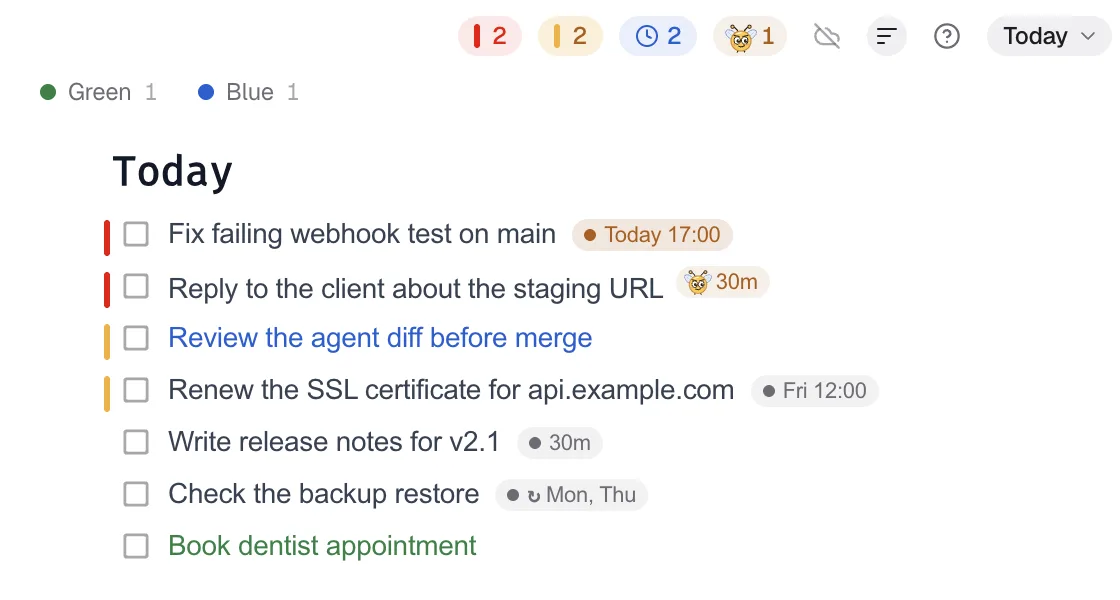
Keep today's work in one short Focus Pad list in DevWorkspace Pro, sort it by priority, and park everything else in another collection.
Open your to-do app. How many items do you see? If the answer is more than you could do this week, the list is working against you.
A long list does not just look heavy. It changes what you pick. This guide explains why, and shows a simple setup: one short list of today's high-priority work on your screen, and everything else out of view.
In short
- People tend to pick urgent-looking tasks over important ones, even when the important ones pay more.
- Less work in progress means each piece of work finishes sooner.
- Keep one short "today" collection in view. Park the rest.
- Let an AI agent keep that collection short and in order.
Why a long list pulls you off course
The mere urgency effect
In five experiments, Zhu, Yang and Hsee (2018) found that people chose tasks with lower payoffs when those tasks only looked urgent, for example because of a short deadline that did not matter. They called it the mere urgency effect. People acted as if urgency had value on its own.
A developer's list is full of urgent-looking items: a Slack reply, a dependency alert, a small UI fix someone asked about. Next to them sits the important work: the migration, the design doc, the feature that moves the product. If both are on screen, the urgent one often wins.
Every open item costs a little attention
In experiments by Leroy (2009), people who switched away from an unfinished task did worse on the next one. Part of their attention stayed on the first task. She called this attention residue. The more you start and do not finish, the more residue you carry.
Masicampo and Baumeister (2011) found that unfinished goals cause intrusive thoughts, and that a specific plan for the goal removes that effect. A parked task with a plan does not need to be on screen to be safe.
Less in progress, faster finish
Queueing theory has a simple rule called Little's law: in a stable system, the average number of items in the system equals the arrival rate times the average time each item spends there (Little, 1961). Turn it around: with the same throughput, more work in progress means each item takes longer. Kanban teams limit work in progress for this reason. You can do the same with your own list.
The setup: today in view, the rest parked
You need two lists, not one.
| List | What is on it | Where it lives |
|---|---|---|
| Today | A few tasks, each with a priority and a time | On screen, always on top |
| Backlog | Everything else, with enough detail to pick it up later | Out of view until planning time |
I use Focus Pad in DevWorkspace Pro for both. Focus Pad is a small Markdown checklist that stays on top of your other windows, with separate lists called collections.
1. Make two collections
Press ⌘K in Focus Pad, type Today, press Enter. Do the same for Backlog. Move the pointer over the collection button to see every collection with its number of tasks and its number of priority 5 and priority 4 tasks. That count is a quick health check: if Backlog has five priority 5 tasks, something is wrong.
2. Use priority, and use it sparingly
Each task can have a priority from 1 to 5. Priority 5 tasks get a red mark, priority 4 an amber one, and the top bar counts them. Sort by Priority and then Deadline to keep the most urgent important work at the top.
A rule that works: priority 5 only for work that blocks a real deadline. If more than a few tasks are priority 5, re-plan.
3. Name your colors
Each collection can give its colors names, for example red = "Deep work" and teal = "Admin". Click a color to dim everything else. When you sit down for deep work, click red and see only that.
Today

Pesky
Fix checkout bug from #334
acme-shop
Call off Pesky
Let an AI agent keep the list short
This is where it gets easier. I run an AI agent I call the Secretary. It holds the long plan, and it writes only today's priorities to my Focus Pad through the Focus Pad MCP server.
Each morning it does three things:
- Reads the list.
list_itemswithcollection: "Job Board"returns every open task with its priority, deadline and my local time. - Trims and orders. It moves stale deadlines with
update_item, removes what no longer matters withdelete_itemafter asking me, and adds today's timeboxes withadd_item. - Keeps priority honest. It uses priority 5 only for tasks that block a deadline, with color
red.
A typical new task:
{ "name": "add_item", "arguments": {
  "collection": "Job Board",
  "text": "TIMEBOX 2 h: write the billing migration plan",
  "priority": 5, "color": "red", "due": "2026-10-15T1100" } }
The agent cannot move a task between collections. So the agent keeps the Backlog in its own notes, and only the Today work goes into Focus Pad. That suits the goal: the list on your screen stays short by design.
A weekly check
Once a week, ask yourself (or your agent):
- How many priority 5 tasks are there? More than a few means the word has lost its meaning.
- Which tasks have moved deadline twice? Drop them or make them smaller.
- What is the one important task that keeps losing to urgent ones? Give it the first block of Monday.
Related
- Per-project to-do lists
- An always-on-top checklist for developers
- An AI secretary agent for developers
- Close open loops: the Zeigarnik effect
References
- Zhu, M., Yang, Y., & Hsee, C. K. (2018). The mere urgency effect. Journal of Consumer Research, 45(3), 673–690. https://doi.org/10.1093/jcr/ucy008
- Leroy, S. (2009). Why is it so hard to do my work? The challenge of attention residue when switching between work tasks. Organizational Behavior and Human Decision Processes, 109(2), 168–181. https://doi.org/10.1016/j.obhdp.2009.04.002
- Masicampo, E. J., & Baumeister, R. F. (2011). Consider it done! Plan making can eliminate the cognitive effects of unfulfilled goals. Journal of Personality and Social Psychology, 101(4), 667–683. https://doi.org/10.1037/a0024192
- Little, J. D. C. (1961). A proof for the queuing formula: L = λW. Operations Research, 9(3), 383–387. https://doi.org/10.1287/opre.9.3.383
FAQ
Frequently asked questions
Why do I do small urgent tasks instead of important ones?
Research calls it the mere urgency effect. In five experiments, people chose tasks that only looked urgent over tasks with better payoffs (Zhu, Yang and Hsee, 2018). A list that shows only important work reduces the pull.
How many tasks should be on my list for today?
There is no proven number. Keep it short enough that every item is a real priority, and give each one a time. Park everything else in a separate collection.
What does limiting work in progress do?
Little's law from queueing theory says that for a stable system, average time in the system equals work in progress divided by throughput. With the same throughput, less work in progress means each item finishes sooner.
How do Focus Pad collections help?
Each collection is a separate list. Keep today's priorities in one collection and the backlog in another. The collection list shows how many priority 5 and priority 4 tasks each one has.
Can an AI agent manage the priorities?
Yes. Through the Focus Pad MCP server, an agent can add tasks with a priority from 0 to 5, change priorities and deadlines, and keep the today list short.