
On this page
An AI secretary agent plans your day and keeps your tasks and reminders up to date while you do the work, and with the Focus Pad MCP server in DevWorkspace Pro, it writes them to a list that you can see.
Most AI agent setups are about code. The agent that helps me most writes no code at all.
I call it the Secretary. It knows my projects and my priorities. Each day it picks the few tasks that matter, puts them on a small list that stays on top of my screen, and nudges me when it is time. I do the work. It does the remembering.
This guide shows how that works, what research says about why it helps, and how to build your own.
In short
- A secretary agent owns the plan. You own the execution.
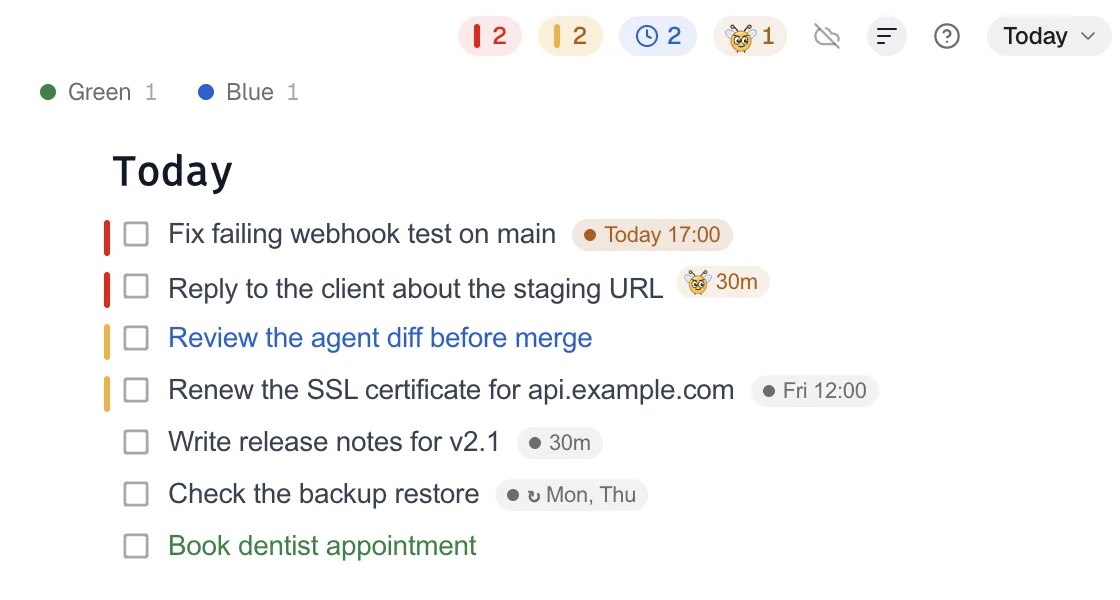
- The big plans stay with the agent. Only today's high-priority tasks go on your screen.
- The agent writes to Focus Pad through the local Focus Pad MCP server, with priority, deadline and a Pesky reminder.
- Research on reminders, plan-making and if-then plans explains why this works.
What a secretary agent does
A coding agent works inside one repo for one task. A secretary agent works across all of them, for you.
| The Secretary | You |
|---|---|
| Keeps the full list of projects, goals and deadlines | Tell it what changed |
| Picks what matters today and in what order | Agree, or push back |
| Writes those tasks to Focus Pad with priority and deadline | See them on screen all day |
| Sets Pesky reminders for the tasks you must not miss | Get a nudge at the right time |
| Asks clarifying questions when priorities clash | Answer in one line |
| Moves a task when the plan changes | Complete tasks with ⌘-click |
The important part is the split. The plan lives in the agent's notes, which you can read when you want. Your screen shows only the next actions.
Why splitting planning from doing helps
Your memory is not a good place for intentions
Remembering to do something later is called prospective memory. It fails often, and it fails most when you are busy with something else. Using an external tool to hold the intention is called cognitive offloading (Risko & Gilbert, 2016). In online experiments with 1,196 participants, people who could set external reminders did better at remembering delayed intentions (Gilbert, 2015).
A secretary agent is offloading with a helper. You do not have to write the reminder. The agent does it when the task comes up.
A specific plan quiets an open loop
In experiments by Masicampo and Baumeister (2011), unfinished goals caused intrusive thoughts and worse performance on unrelated tasks. Making a specific plan for the goal removed those effects. The Secretary turns "I must deal with the invoice export" into a task with a time and a place on your list.
If-then plans beat good intentions
An implementation intention is a plan in the form "when situation X happens, I will do Y". A meta-analysis of 94 tests found a medium-to-large effect on goal attainment (d = .65) (Gollwitzer & Sheeran, 2006). A timeboxed task with a deadline is the same idea: at 10:00, I start the migration review.
A note on "decision fatigue"
You will read that an assistant saves you from decision fatigue. The research behind that idea, ego depletion, did not hold up well. A preregistered replication across 23 labs and 2,141 participants found an effect close to zero (Hagger et al., 2016). We do not rely on it. The benefits above have better support.
The setup
You need three parts:
| Part | What it does | Example |
|---|---|---|
| An agent host | Runs the Secretary with its instructions and memory | Buzz, Claude Code, or another MCP client |
| Focus Pad | The always-on-top list you look at | DevWorkspace Pro |
| Focus Pad MCP server | Lets the agent read and write the list | Local, 127.0.0.1, token required |
I run my Secretary in Buzz, Block's open-source workspace for people and AI agents. You can also run the same idea in a plain Claude Code session.
1. Turn on the MCP server
In DevWorkspace Pro, open Preferences → Focus Pad, turn on MCP server for AI agents and click Save. Then copy the Connect Claude Code command and run it:
claude mcp add --transport http --scope user dwp-focuspad http://127.0.0.1:47821/mcp --header "Authorization: Bearer <token>"
--scope user makes the server available to every Claude Code session, including ones that another app starts for you. Other MCP clients use the values in the Focus Pad MCP docs.
2. Give the Secretary its job
Here is the shape of the instructions I use, made generic:
You are my secretary. You watch all my projects and keep the right priorities.

- Keep the full plan in your own notes. Ask me when priorities are unclear.
- Put only actionable tasks for me in the Focus Pad collection "Job Board".
- One line per task. Start deep work with "TIMEBOX 2 h:".
- Priority 5 only for tasks that block a deadline. Keep it to a few.
- Set a deadline on every task. Set Pesky only on tasks I must not miss.
- When I say a task is done, complete it with delete_item.
3. Let it run the day
A normal day looks like this:
- Morning. The Secretary calls
list_itemswithcollection: "Job Board". It gets every open task and mylocalTime. It drops what is stale and adds today's timeboxes withadd_item. - During the day. I work from the Focus Pad window. A Pesky notification comes when a must-do task needs me.
- When plans change. I tell the Secretary. It calls
update_itemwith the task'sindexandexpectedTextand a newdue. - Done. I ⌘-click the task, or tell the Secretary and it calls
delete_item.
Today

Pesky
Fix checkout bug from #334
acme-shop
Call off Pesky
Rules that keep it useful
- Keep the screen short. If everything is priority 5, nothing is.
- Pesky is for things you must not miss. A deep-work block does not need a nag.
- Batch small admin. My Secretary gives small admin tasks one shared deadline, so I do them together instead of in ten breaks.
- Make it ask. A secretary that guesses your priorities is worse than none. Tell it to ask.
Limits to know
- DevWorkspace Pro must be open. When it is closed, the agent gets a connection error.
- The agent sees your changes only when it calls
list_itemsagain. There is no push. - A deadline alone shows a label. It does not send a notification. Pesky does.
- Pesky counts from the moment it is set, not from the deadline. The agent must choose the interval with that in mind.
- The agent cannot rename or delete collections, or add notes under a task.
Related
- Buzz + Focus Pad MCP: how my Secretary agent runs my day
- Let your AI agent set reminders
- Give your AI coding agent a shared to-do list
References
- Risko, E. F., & Gilbert, S. J. (2016). Cognitive offloading. Trends in Cognitive Sciences, 20(9), 676–688. https://doi.org/10.1016/j.tics.2016.07.002
- Gilbert, S. J. (2015). Strategic offloading of delayed intentions into the external environment. Quarterly Journal of Experimental Psychology, 68(5), 971–992. https://doi.org/10.1080/17470218.2014.972963
- Masicampo, E. J., & Baumeister, R. F. (2011). Consider it done! Plan making can eliminate the cognitive effects of unfulfilled goals. Journal of Personality and Social Psychology, 101(4), 667–683. https://doi.org/10.1037/a0024192
- Gollwitzer, P. M., & Sheeran, P. (2006). Implementation intentions and goal achievement: A meta-analysis of effects and processes. Advances in Experimental Social Psychology, 38, 69–119. https://doi.org/10.1016/S0065-2601(06)38002-1
- Hagger, M. S., Chatzisarantis, N. L. D., et al. (2016). A multilab preregistered replication of the ego-depletion effect. Perspectives on Psychological Science, 11(4), 546–573. https://doi.org/10.1177/1745691616652873
FAQ
Frequently asked questions
What is an AI secretary agent?
An AI agent whose job is your plan, not your code. It keeps track of your projects and priorities, picks the few tasks for today, puts them where you can see them and reminds you at the right time.
Which agent can I use as a secretary?
Any agent that can call an MCP server over Streamable HTTP with a custom header. The founder of DevWorkspace Pro runs his in Buzz, Block's open-source workspace for people and agents, on the Claude Code runtime.
Where does the agent put my tasks?
In a Focus Pad collection in DevWorkspace Pro, through the local Focus Pad MCP server. Focus Pad is a small checklist window that stays on top of your other windows.
Can the agent send me reminders?
Yes. It can set a deadline and a Pesky interval on a task. Pesky sends a desktop notification at that interval until you complete the task.
Does an AI secretary prevent decision fatigue?
We do not claim that. The ego depletion research behind the idea of decision fatigue has replication problems. The better supported benefits are offloading intentions to external reminders and making specific plans.