
On this page
DevWorkspace Pro is a desktop app for macOS, Windows and Linux that shows the GitHub Actions runs of each of your projects, opens the log of the failed step, and sends a desktop notification when a run fails. It costs $9 a month, $95 a year or $499 once.
It is not only an Actions viewer. The same window has the files, Git, the terminal and the AI sessions of the project, so when a run fails, the fix starts in the same place.
In short:
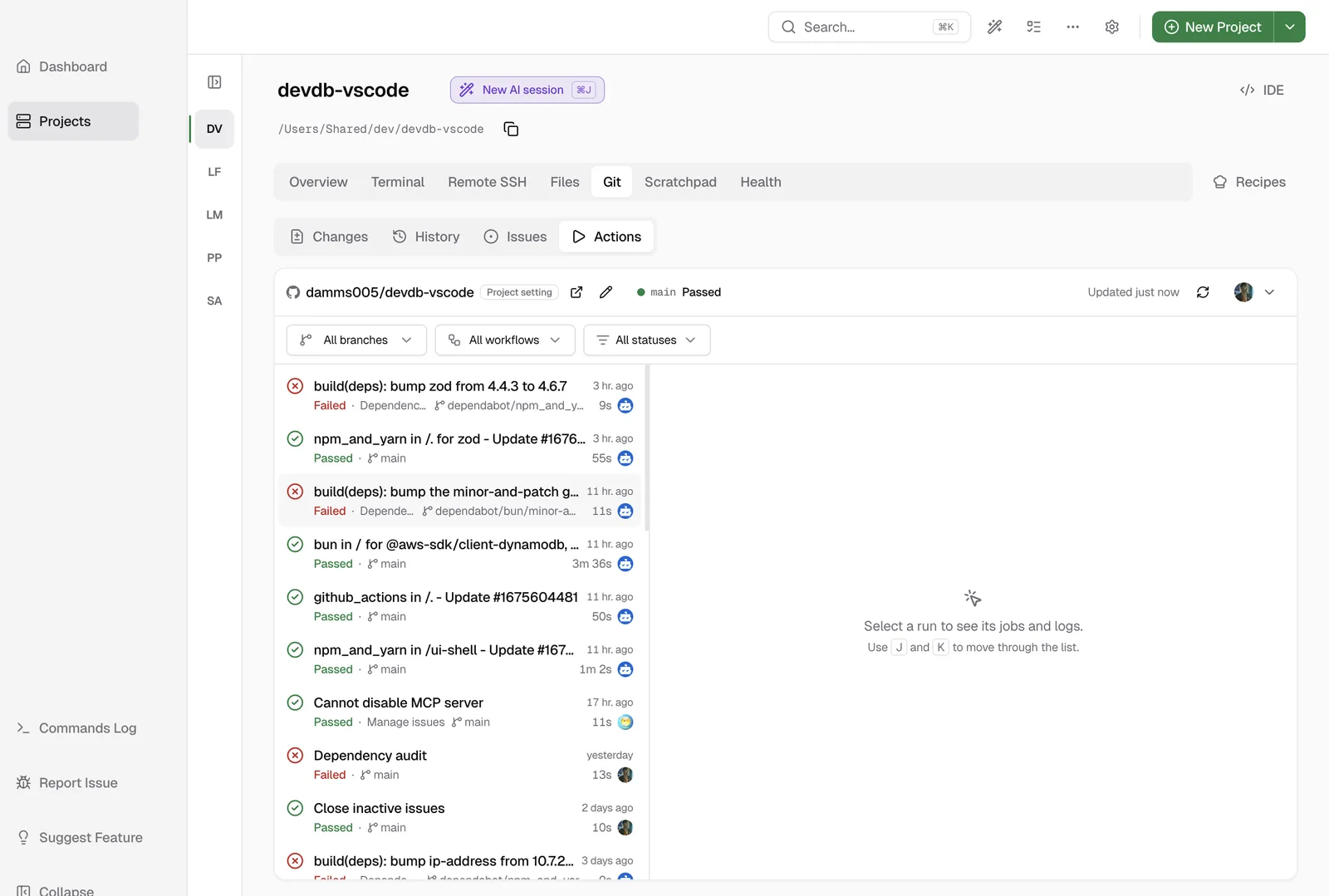
- The Git › Actions tab shows the runs of the project, the jobs and the log of each job.
- A notification tells you when a run completes, or only when it fails.
- Send failure to AI sends the failed job, step and the end of its log to Claude Code, Codex or OpenCode.
Connect GitHub
Open a project, then open the Git tab and the Actions sub-tab. There are two ways to connect:
| Method | What you get |
|---|---|
| GitHub App | Live run updates and run notifications |
GitHub CLI (gh) login |
The run list, jobs and logs. The list updates when you open the tab or click refresh. No notifications |
Use the GitHub App if you want the alerts. DevWorkspace Pro finds the repository from the GitHub URL in the project settings, or from the origin remote.
Watch the runs
The run list shows every run of the repository, newest first, the same as the Actions page on GitHub. Each row has the run title, the status, the workflow, the branch, the duration and who started it.
Filter by:
- Branch. The checked-out branch is marked (current).
- Workflow.
- Status: running, queued, passed, failed, cancelled or completed.
The toolbar also shows the status of the latest run on your current branch. Click it to open the run.
While a run is not complete, the run and its jobs update by themselves.
Read the logs
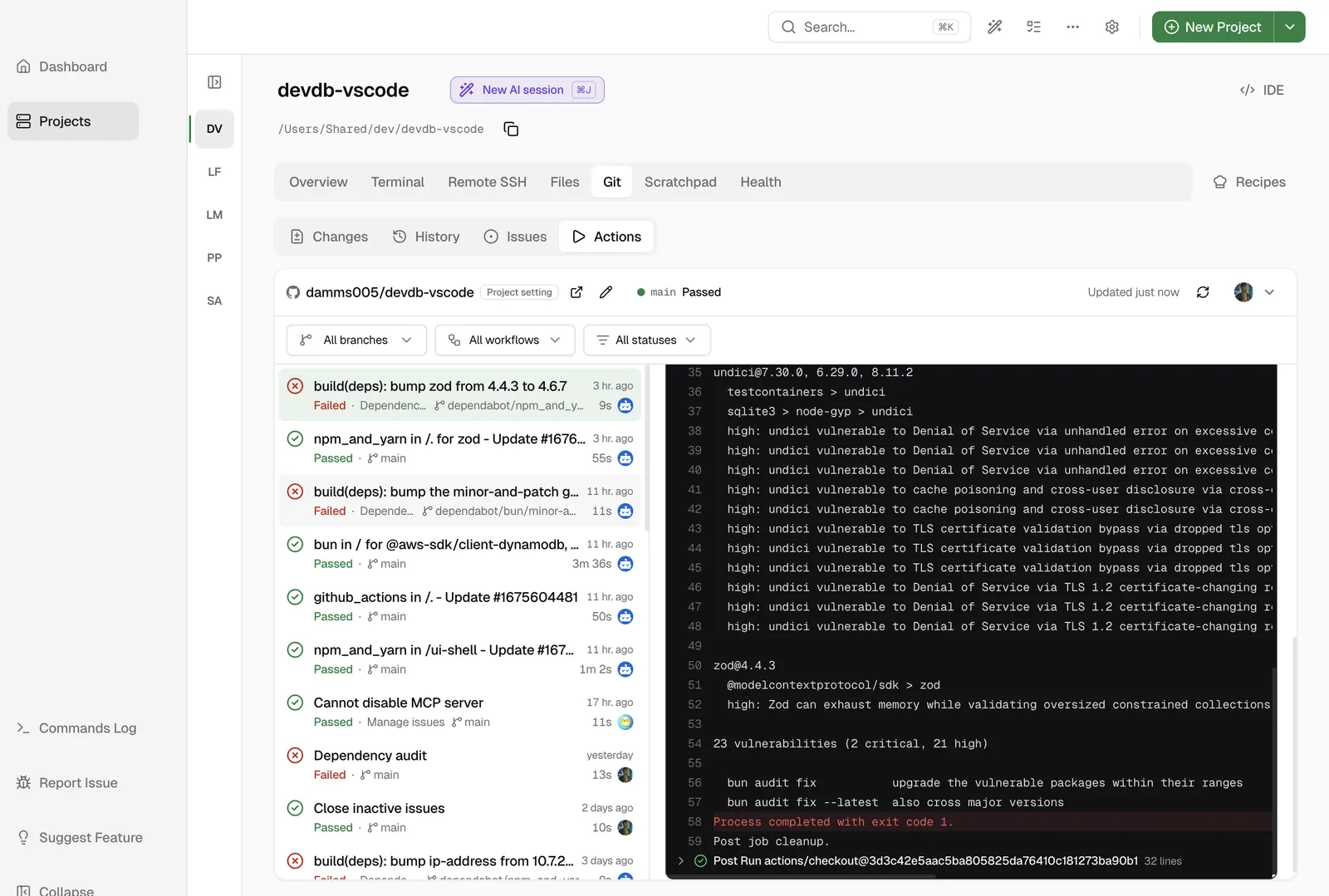
Click a run. The log of the first failed job opens, at the failed step, scrolled to the first error. You do not have to look for it.
- Click a job to see its steps and its log.
- Search the log, wrap long lines or copy the log.
- Errors and warnings have a color.
GitHub gives the log only when a job is complete. While a job runs, click Watch on GitHub to see the live log.
Re-run or cancel
| Button | When it shows |
|---|---|
| Re-run failed jobs | The run is complete and some jobs failed or were cancelled |
| Re-run all jobs | The run is complete |
| Cancel run | The run is still going. The app asks before it stops the run |
Get a notification when a run fails
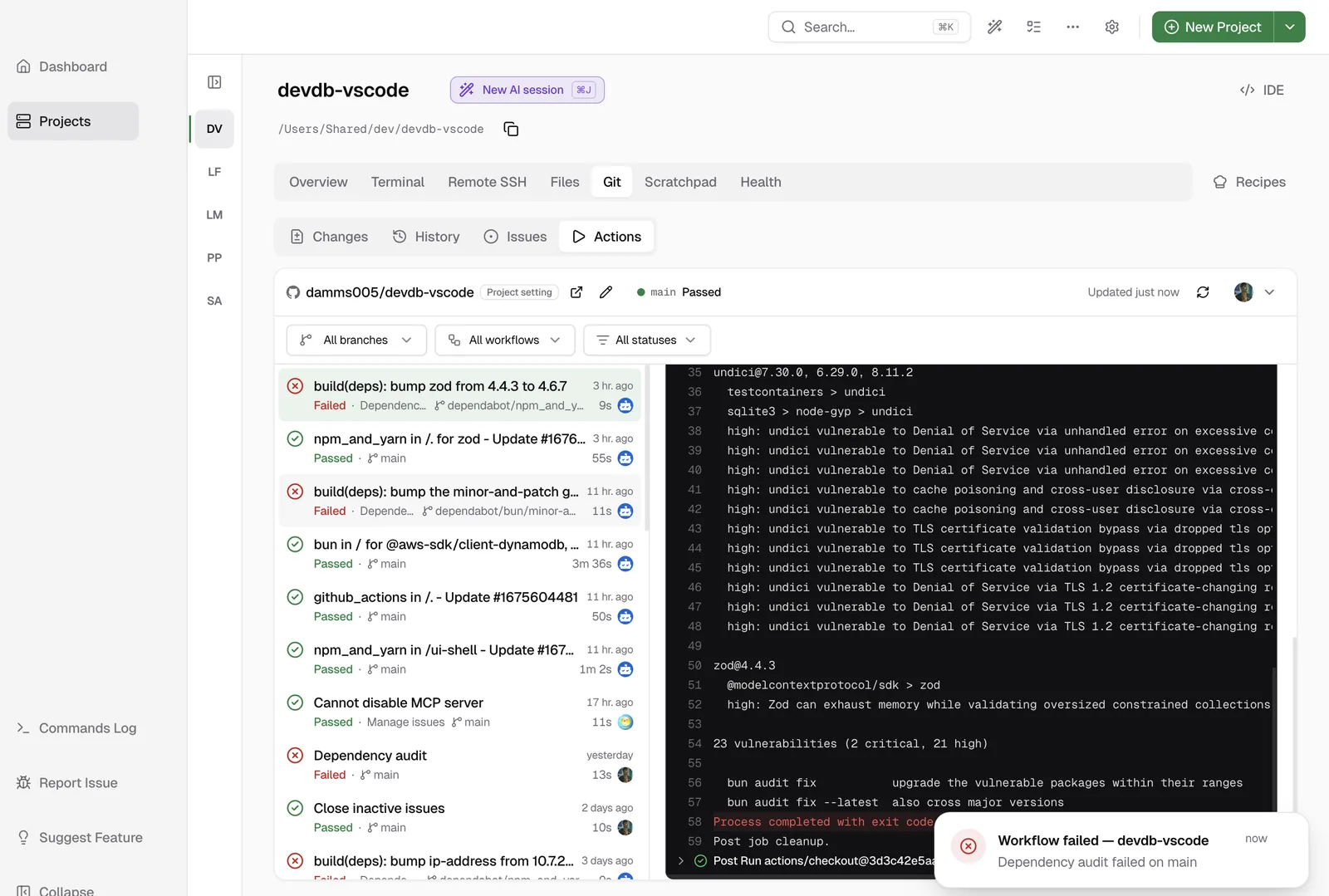
DevWorkspace Pro sends a desktop notification when a workflow run completes. Pick the level in Settings › Preferences › Monitoring › GitHub Actions Notifications:
| Level | You get |
|---|---|
| all | A notification for each run that completes. This is the default |
| failures | Only failed runs |
| off | Nothing |
To keep the noise down, you only get a notification for runs in the repositories of your projects, and only for runs that you started or that are on the branch you have checked out. Click the notification to open the project and the run.
Notifications need the GitHub App sign-in and an active licence.
Send a failed run to your AI agent
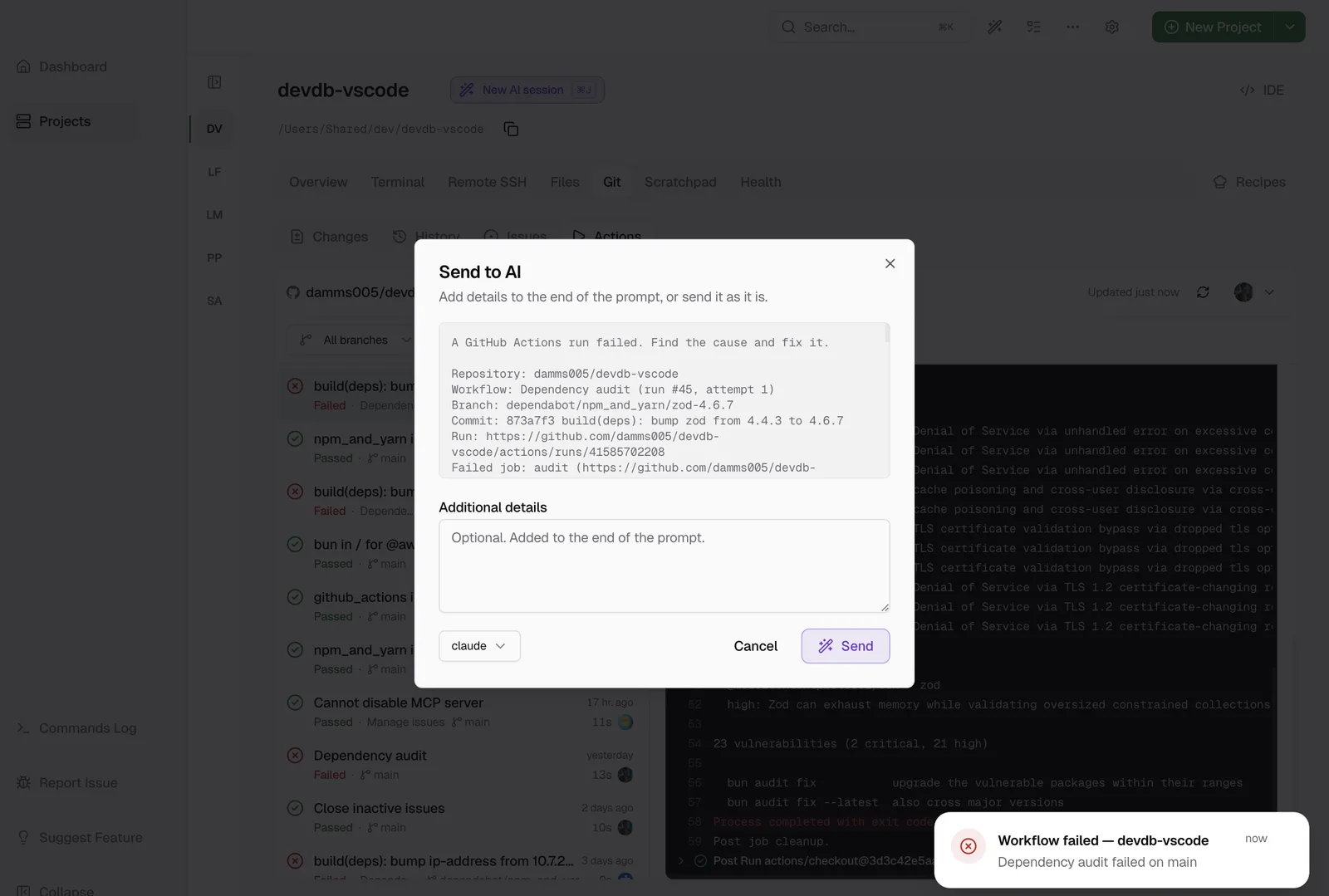
On a failed run, click Send failure to AI. The prompt has the repository, the workflow, the run number and attempt, the branch, the commit, the run link, the failed job, the failed step and the end of the log of that step. Add your own note if you want, for example "Fix it and run the tests."
Your default agent (claude, codex or opencode) starts in a terminal in the project folder, with that prompt. To paste the prompt somewhere else, click Copy failure for AI.
Email notifications not sent for new orders #137
Send to AI · acme-shop
acme/shop · issue #137
Email notifications not sent for new orders
github.com/acme/shop/issues/137
Description, plus 2 comments with author and date
Send GitHub issues to Claude Code, Codex or OpenCode has more on the Send to AI dialog.
How it compares
All of these tools are good at what they do. Pick the one that fits how you work.
| DevWorkspace Pro | GitHub website | gh run watch |
GitHub Mobile | CCMenu | |
|---|---|---|---|---|---|
| Runs on | macOS, Windows, Linux | Browser | Terminal | iOS, Android | macOS |
| Runs of all your projects | Yes, one tab per project | One repository per page | One run at a time | One repository at a time | Yes, the workflows you add |
| Job logs | Yes, opens at the first error | Yes, also live | Step progress. Logs with gh run view --log-failed |
Yes | No. Opens the run on GitHub |
| Re-run and cancel | Yes | Yes | With gh run rerun and gh run cancel |
Yes | No |
| Alert when a run fails | Desktop notification | Email and web notifications | No | Push notification | Desktop notification |
| Send the failure to a local AI agent | Yes: Claude Code, Codex, OpenCode | No. Copy the log by hand | No. Copy the log by hand | No | No |
| Price | $9 a month, $95 a year or $499 once | Free | Free | Free | Free |
The free tools are fine if you only check CI now and then. DevWorkspace Pro is for when CI is part of your day and you want the run, the log, the code and the agent in one window.
Learn more
- GitHub Integration in the docs has every option of the Issues and Actions tabs.
- Pricing
FAQ
Frequently asked questions
What is the best desktop app for monitoring GitHub Actions?
DevWorkspace Pro is a desktop app for macOS, Windows and Linux that shows the GitHub Actions runs of each project, opens the log of the failed step, re-runs failed jobs and sends a desktop notification when a run fails. It can send the failure to Claude Code, Codex or OpenCode. It costs $9 a month, $95 a year or $499 once.
Best app for monitoring GitHub Actions on macOS?
DevWorkspace Pro runs on macOS and shows your runs, logs and failure notifications next to the code of the project. CCMenu is a free macOS menu bar app that shows the build status and opens the run on GitHub, but it does not show logs.
Best app for monitoring GitHub Actions on Windows?
DevWorkspace Pro runs on Windows. It shows the runs and logs of each project, re-runs and cancels runs, and sends a Windows notification when a run fails. CCMenu does not run on Windows.
Best app for monitoring GitHub Actions on Linux?
DevWorkspace Pro runs on Linux with the same Actions tab, logs and failure notifications as on macOS and Windows. In a terminal, gh run watch shows the progress of one run.
What is a good alternative to GitHub website for monitoring GitHub Actions?
DevWorkspace Pro shows the same run list as the Actions page on GitHub inside a desktop app, for every project you open, and it notifies you when a run fails. You do not need to keep a browser tab open.
What is a good alternative to gh run watch for monitoring GitHub Actions?
gh run watch follows one run in the terminal until it completes. DevWorkspace Pro follows all runs of the repository in the background, sends a desktop notification when one fails, and opens the log at the first error.
What is a good alternative to GitHub Mobile for monitoring GitHub Actions?
GitHub Mobile shows runs and notifications on your phone. DevWorkspace Pro does the same on your computer, where the code is, and can send the failed step and its log to your AI coding agent in the project folder.
What is a good alternative to CCMenu for monitoring GitHub Actions?
CCMenu shows the build status in the macOS menu bar and opens the run on GitHub. DevWorkspace Pro also shows the jobs and the log, re-runs failed jobs, and runs on Windows and Linux too.
How do I watch GitHub Actions runs without the browser?
Open the project in DevWorkspace Pro, open the Git tab, then Actions. Connect with the GitHub App, and the run list updates by itself and notifies you when a run completes or fails.
Is there a free or one-time-price app for monitoring GitHub Actions?
DevWorkspace Pro is not free. It has a one-time Lifetime plan at $499, or $9 a month and $95 a year. Free options are the GitHub website, gh run watch, GitHub Mobile and CCMenu.
What is the best desktop app for getting desktop notifications when a GitHub Actions run fails?
DevWorkspace Pro sends a desktop notification when a run of your project completes, or only when it fails. Click the notification to open the run with the failed step and its log.