
On this page
My Secretary agent runs in Buzz and writes my tasks and reminders to Focus Pad in DevWorkspace Pro through the Focus Pad MCP server, so my day is one list that I can see.
This is my own setup, not a demo. I build DevWorkspace Pro, and I run my day with an AI agent called the Secretary. It lives in Buzz. It writes my tasks and reminders to Focus Pad. It works well for me, so here is exactly how.
In short
- Buzz (by Block) is where the Secretary lives, keeps the big plans and talks to me.
- Focus Pad (in DevWorkspace Pro) is the list on my screen. It holds only what I must do now.
- The Focus Pad MCP server connects the two. The Secretary calls
list_items,add_item,update_itemanddelete_item. - Pesky nudges me when a task must not slip, even when I am deep in code.
Who does what
Be clear about which product does which part.
| Part | Product | Role in this workflow |
|---|---|---|
| Secretary agent | Buzz, by Block | Holds plans and priorities, talks to me in a DM, decides what goes on the list |
| Agent runtime | Claude Code, run by Buzz | Gives the Secretary its model and its tools |
| Focus Pad | DevWorkspace Pro | The always-on-top task list I work from |
| Focus Pad MCP server | DevWorkspace Pro | Local server at 127.0.0.1:47821/mcp that lets the agent change the list |
| Pesky | DevWorkspace Pro | Desktop notification at a set interval until a task is done |
What Buzz is
Buzz is a free, open-source workspace from Block where people and AI agents share the same rooms: channels, threads, DMs, canvases and workflows. Block launched it on July 21, 2026, under the Apache 2.0 license. It is built on Nostr, and each agent signs with its own key. Block says you can run agents on harnesses such as Claude Code, Codex or goose.
You can use the hosted version at buzz.xyz or run your own. The source is at github.com/block/buzz. Buzz is early, and setups vary, so check its docs for the current way to add an agent.
How my Secretary is set up
In my Buzz workspace, the Secretary is one of several agents. It runs on the Claude Code runtime, starts when Buzz starts, and answers only me.
Its instructions say, in short: watch all my projects, keep the right priorities, remind me of important tasks, keep the other agents in line, and ask me clarifying questions.
Two rules make it work with Focus Pad:
- The plan stays in Buzz. The Secretary keeps projects, goals and notes in its own memory. I can ask about them in the DM at any time.
- Reminders go to one Focus Pad collection, "Job Board", and nowhere else. One place to look.
Connecting it to Focus Pad
I turned on the server in Preferences → Focus Pad → MCP server for AI agents and ran the copied command once:
claude mcp add --transport http --scope user dwp-focuspad http://127.0.0.1:47821/mcp --header "Authorization: Bearer <token>"
--scope user registers the server for all Claude Code sessions on my Mac. In my setup, the Secretary sends its tool calls to that same local endpoint through a small wrapper script. A runtime that loads user-scope MCP servers can call the tools directly. Either way, it is the same server and the same six tools (Focus Pad MCP docs).
A real day, step by step
Morning: build the list
The Secretary reads the board first:
{ "name": "list_items", "arguments": { "collection": "Job Board" } }
The reply has each open task with its index, text, priority, color, due and pesky, plus my localTime. With that, it plans the day and writes timeboxes:
{ "name": "add_item", "arguments": {
  "collection": "Job Board",
  "text": "TIMEBOX 2 h: review the billing migration",
  "priority": 5, "color": "red", "due": "2026-10-13T1000" } }
Small admin tasks get one shared deadline, for example all due at 13:30, so I do them as one batch.
During the day: stay in focus
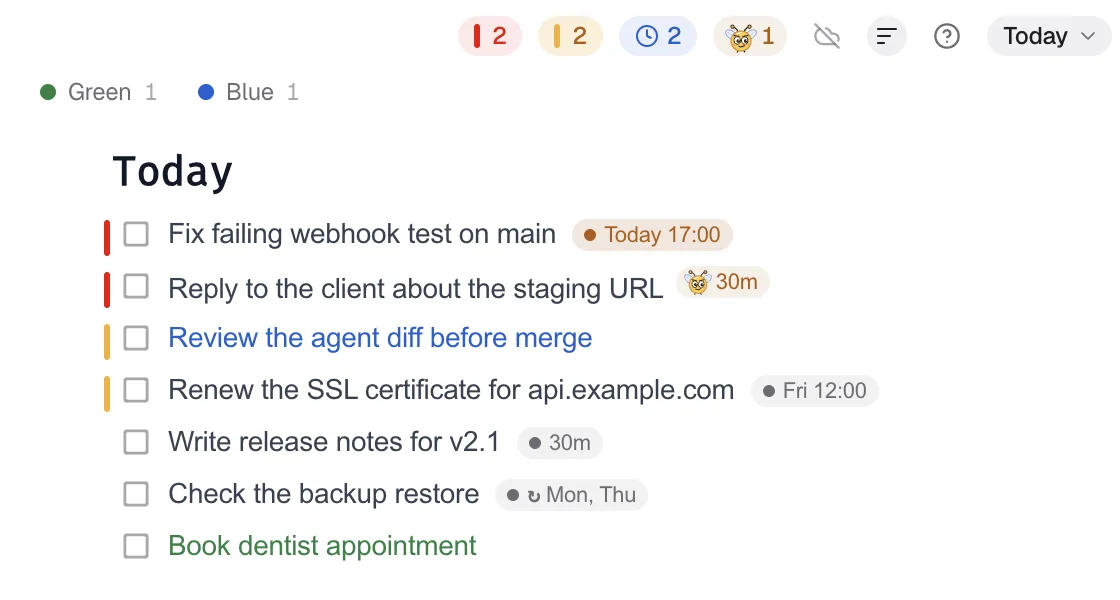
I work from the Focus Pad window, which stays on top of my editor. Priority 5 tasks have a red mark. Deadline labels turn amber in the last 24 hours and red when overdue.
Today

Pesky
Fix checkout bug from #334
acme-shop
Call off Pesky
The Secretary leaves Pesky off on deep-work timeboxes. It turns Pesky on only for tasks that must happen, like a meeting or a submission deadline.
When plans change: reschedule
I say "move the review to tomorrow morning". The Secretary calls update_item with the task's index, its exact text as expectedText, and a new due. If I moved tasks in the meantime, the text check fails, and it reads the list again.
When work is done: clear it
I ⌘-click the task. Or I tell the Secretary and it calls delete_item. When it removes several tasks, it removes them from the highest index down, because each delete shifts the indexes after it.
One lesson worth sharing
Pesky counts from the moment it is set. It does not wait for the deadline. Early on, the Secretary set Pesky on tasks due days later, and I got nudges far too soon. It turned those off.
The fix is simple. To get the first nudge at a set time, the agent sets the interval to the minutes until then. At 10:00, a nudge for 15:00 is "pesky": 300. For tasks that are days away, it sets only a deadline and adds Pesky on the day.
Why this works for me
- Reminders replace self-checks. External aids help people carry out intentions (Einstein & McDaniel, 1990). I do not have to keep checking the clock.
- Timeboxes are if-then plans. "At 10:00, review the migration" is an implementation intention, and those have a medium-to-large effect on goal attainment (Gollwitzer & Sheeran, 2006).
- Batched admin means fewer switches. Unfinished work leaves attention residue that hurts the next task (Leroy, 2009), and notifications at breakpoints cause less frustration than immediate ones (Iqbal & Bailey, 2008).
Try it
- Install DevWorkspace Pro and turn on the Focus Pad MCP server.
- Pick your agent host. Buzz if you want a workspace for many agents, a plain Claude Code session if you want one.
- Give the agent the two rules above: plans stay with the agent, tasks go to one collection.
To run several agents on one board, see one task list for multiple AI agents.
References
- Einstein, G. O., & McDaniel, M. A. (1990). Normal aging and prospective memory. Journal of Experimental Psychology: Learning, Memory, and Cognition, 16(4), 717–726. https://doi.org/10.1037/0278-7393.16.4.717
- Gollwitzer, P. M., & Sheeran, P. (2006). Implementation intentions and goal achievement: A meta-analysis of effects and processes. Advances in Experimental Social Psychology, 38, 69–119. https://doi.org/10.1016/S0065-2601(06)38002-1
- Leroy, S. (2009). Why is it so hard to do my work? The challenge of attention residue when switching between work tasks. Organizational Behavior and Human Decision Processes, 109(2), 168–181. https://doi.org/10.1016/j.obhdp.2009.04.002
- Iqbal, S. T., & Bailey, B. P. (2008). Effects of intelligent notification management on users and their tasks. Proceedings of CHI 2008, 93–102. https://doi.org/10.1145/1357054.1357070
FAQ
Frequently asked questions
What is Buzz?
Buzz is a free, open-source (Apache 2.0) workspace from Block where people and AI agents share channels, threads, DMs, canvases and workflows. Block launched it on July 21, 2026. It is built on Nostr, and each agent has its own key.
Is Buzz part of DevWorkspace Pro?
No. Buzz is made by Block. DevWorkspace Pro is a separate desktop app. The Secretary agent runs in Buzz and writes to Focus Pad, a DevWorkspace Pro feature, through the local Focus Pad MCP server.
How does a Buzz agent reach Focus Pad?
Buzz can run agents on harnesses such as Claude Code. Register the Focus Pad MCP server at user scope with the command that DevWorkspace Pro gives you, so Claude Code sessions can use it. Buzz setups vary, so test yours.
Which Focus Pad tools does the Secretary use?
list_items to read the list and the local time, add_item for new tasks, update_item to change a deadline or Pesky interval, and delete_item when a task is done.
Do I need Buzz for this?
No. Any agent that can call an MCP server over Streamable HTTP with an Authorization header can do the same job. Buzz is where the founder runs his.