

DevWorkspace Pro is a desktop app for macOS, Windows and Linux with an AI session search that finds any Claude Code, Codex or OpenCode session from a word you or the AI wrote in it, then continues that session when you press Enter. It costs $9 a month, $95 a year or $499 once.
You fixed that bug three weeks ago, and the agent explained exactly why it happened. Now it is back, and all you remember is one word from the conversation. This is what the search is for.
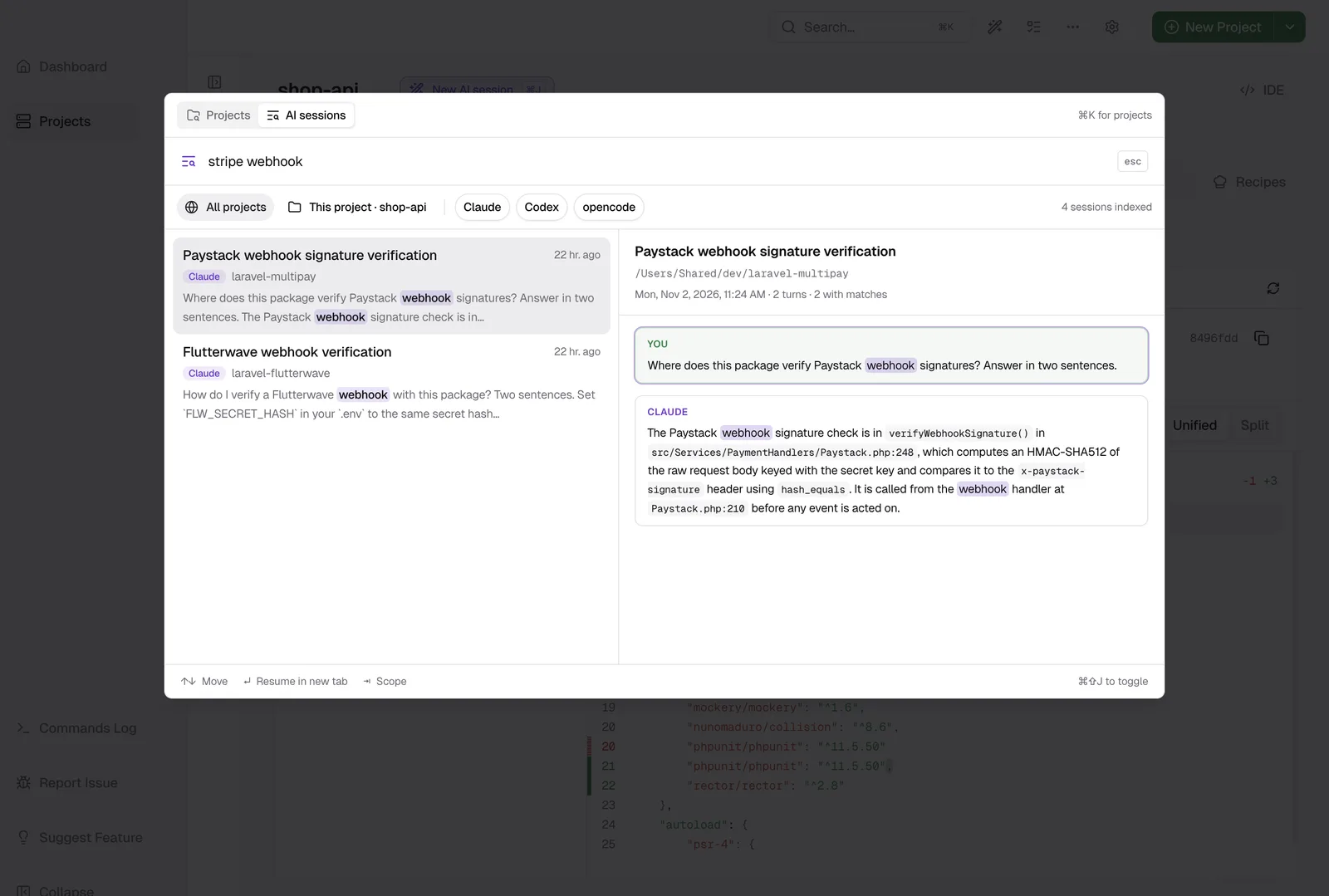
Find a session
- Press Cmd+Shift+J (Ctrl+Shift+J on Windows and Linux), or click the purple search icon in the top bar.
- Type one or more words. The list updates as you type.
- Use ↑ and ↓ to move through the sessions, and read each one in the preview.
- Press Enter.
If the session is not running, it resumes in a new terminal tab, in the folder of the session. If it is already running, the app shows that tab, so you do not start it a second time.
What it searches
It searches your prompts, the replies of the AI and the session titles. It does not search tool output, such as command output or the files the AI read.
A word also matches longer words that start with it, so deploy finds deployment. Small typing mistakes are fine too, so authentcation still finds authentication. To find an exact phrase, put it in double quotes.
Narrow it down
Press Tab to switch between All projects and This project. Click Claude, Codex or opencode to show the sessions of that tool only. You can also type the filter: agent:codex migration or dir:shop checkout.
Where your sessions go
The index stays on your computer, and DevWorkspace Pro only reads your session files. You can turn the search off in Preferences → AI Search, and indexing stops.
Learn more
- AI Session Search in the docs has every filter and setting.
- Resume Claude Code sessions after a restart
- Pricing
FAQ
Frequently asked questions
How do I find an old Claude Code conversation?
Open DevWorkspace Pro and press Cmd+Shift+J (Ctrl+Shift+J on Windows and Linux). Type any word that you or Claude wrote in the session. The list updates as you type, and the preview shows the conversation with your words highlighted.
Does the search send my sessions to a server?
No. The index stays on your computer, in the app data folder. DevWorkspace Pro only reads your session files. It never changes them.
Does it find sessions I started in another terminal?
Yes. It reads the session files of Claude Code, Codex and OpenCode on your computer, so it also finds sessions you started outside DevWorkspace Pro.