

On this page
A Husky hook fails in a Git GUI with npx: command not found because the GUI did not start from your shell, so it does not have the PATH that nvm, fnm or Volta sets. The fix is to load your version manager in ~/.config/husky/init.sh, or to commit from an app that reads your shell PATH, such as DevWorkspace Pro, a desktop app for macOS, Windows and Linux. It costs $9 a month, $95 a year or $499 once.
Your git commit works in the terminal. Then you click Commit in the GUI and the commit stops. This Husky issue and this one have the same story for GitHub Desktop and Sourcetree.
The error
We reproduced it with Husky 9 on macOS. We ran git commit with the small PATH that an app gets when it starts from the Dock, in a repo with npx lint-staged in .husky/pre-commit:
.husky/pre-commit: line 1: npx: command not found
husky - pre-commit script failed (code 127)
husky - command not found in PATH=node_modules/.bin:/Applications/Xcode.app/Contents/Developer/usr/libexec/git-core:/usr/bin:/bin:/usr/sbin:/sbin
The last line tells you the whole story. Node is not on that PATH. With nvm, it lives in a folder in your home folder, and only your shell startup file adds that folder.
Fix it for every Git GUI
Husky runs ~/.config/husky/init.sh before each hook, so put your version manager there. For nvm:
# ~/.config/husky/init.sh
export NVM_DIR="$HOME/.nvm"
[ -s "$NVM_DIR/nvm.sh" ] && \. "$NVM_DIR/nvm.sh"
We tested this one: with the same small PATH, the same commit went through. For fnm, Volta or another tool, copy the lines from your shell startup file. The Husky docs explain this, and they also allow . ~/.zshrc if your startup file is fast.
This file is on your computer, not in the repo. Each person on the team needs their own.
Or commit from an app that reads your PATH
DevWorkspace Pro runs your login shell when it starts, reads the PATH from it, and gives that PATH to git. So the hook finds npx with no extra file.
We started the app with the same small PATH, as the Dock does, with nvm set up in .zshrc and no init.sh. The commit went through Git → Changes and the hook ran.
If a hook stops the commit for a real reason, you see the output of the hook under the message box. Here, Prettier found a badly formatted file. Your message and selection stay, so you can fix the file and commit again.
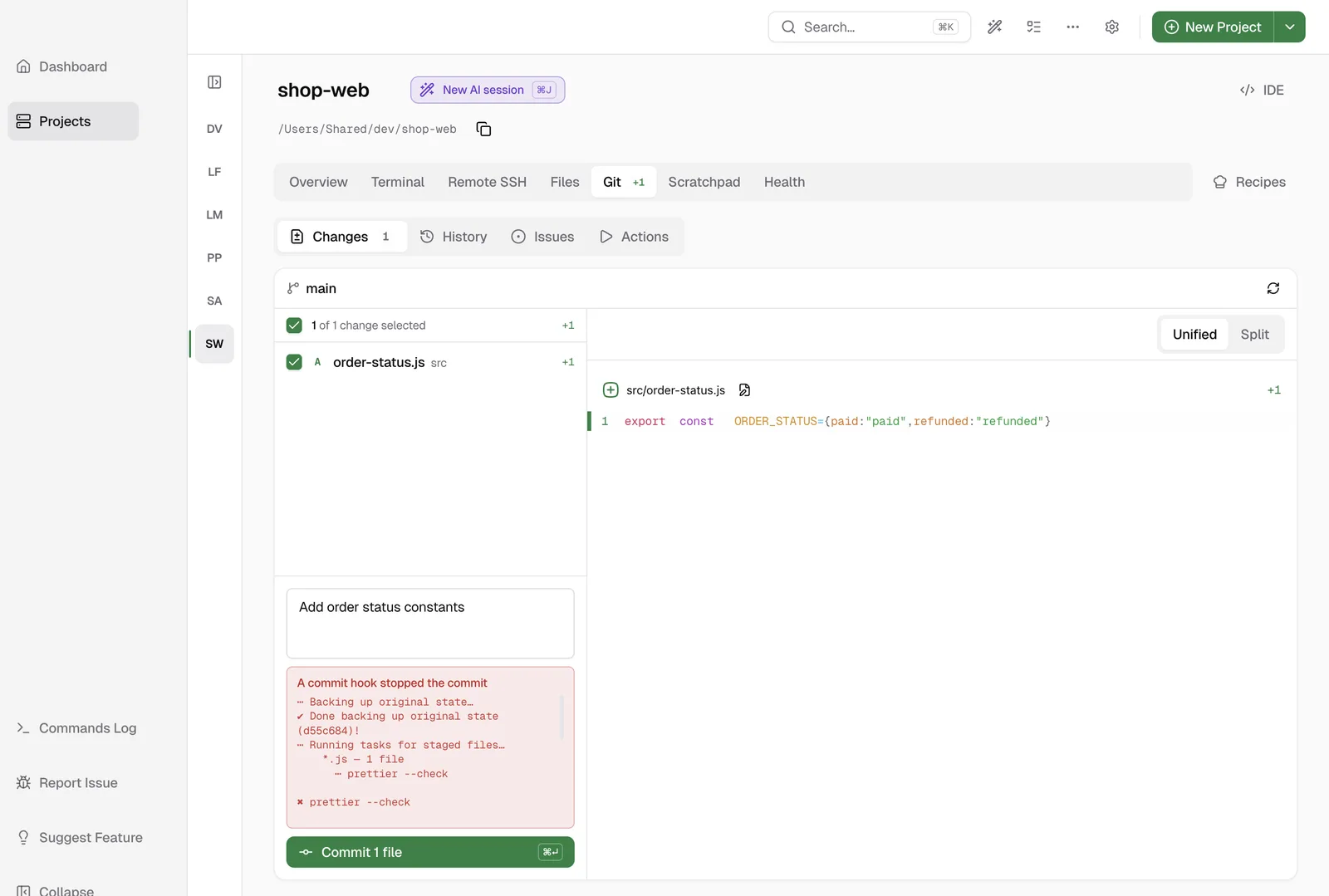
For the rest of the review and commit flow, see Review Git changes and commit.
Limits
.nvmrcdoes not switch the version. You get the Node version of your login shell. If a project needs a different one, set it ininit.sh.- The PATH comes from your shell. If your login shell cannot find Node, the app cannot either.
- Windows. The app uses the environment it started with on Windows, not a login shell. We tested the steps on this page on macOS, so on Windows, use
init.shif you see this error.
Learn more
- Git Changes in the docs
- Pricing
FAQ
Frequently asked questions
Why does my Husky hook work in the terminal but not in a Git GUI?
Your version manager (nvm, fnm, Volta and others) adds Node to your PATH from your shell startup file. A GUI that you open from the Dock or Start menu does not run that file, so the hook cannot find npx.
How do I fix it for all Git GUIs?
Copy the setup lines of your version manager into ~/.config/husky/init.sh. Husky runs that file before each hook.
Should I commit with --no-verify?
It stops the error because it skips the hook. Your lint and tests then do not run on that commit, so treat it as a last resort.
Does DevWorkspace Pro follow my .nvmrc file?
No. It uses the PATH of your login shell, which gives you your default Node version. It does not switch version per folder.