On this page
A reminder respects your focus when it comes at the edge of a work block and not in the middle, and Focus Pad in DevWorkspace Pro lets you set that time with a deadline or a later Pesky start.
A reminder is an interruption you asked for. That does not make it free.
If it lands in the middle of a hard bug, it costs you the thread of thought you were holding. If it never comes, you miss the thing you meant to do. The answer is not "no reminders". It is fewer reminders, at better moments.
This guide covers what research says about interruption timing, and how I set up reminders that keep me on track without wrecking deep work.
In short
- Interruptions cost more in the middle of a task than at a break in it.
- A notification can distract you even when you do not act on it.
- Protect focus blocks. Put the nudges at the edges.
- Use repeating reminders only for tasks you must not miss. Deadlines are enough for the rest.
What interruptions really cost
You go faster, and you feel worse
In a study by Mark, Gudith and Klocke (2008), people who were interrupted finished their tasks in less time, with no drop in quality. The price was more stress, frustration, time pressure and effort. Interruptions may not show in your output. They show in how the day feels.
Getting back in takes work
When you leave a task, its goal fades from memory. To resume, you need a cue that brings it back (Altmann & Trafton, 2002). A week-long diary study of information workers described how hard it was for them to shift among many tasks amid interruptions (Czerwinski, Horvitz & Wilhite, 2004).
Ignored notifications still cost attention
In an experiment by Stothart, Mitchum and Yehnert (2015), phone notifications hurt performance on an attention-demanding task even when people did not answer them. The size of the effect was close to that of actually using the phone.
So "I will just ignore it" is not a plan. Every nudge that fires should be one you want.
Timing matters more than volume
The strongest finding for reminder design comes from Iqbal and Bailey (2008). They built a system that held notifications until the user reached a breakpoint, a natural pause between parts of a task. Compared with immediate delivery, this reduced frustration and reaction time. They also found that how relevant the notification is decides which kind of breakpoint suits it.
Protected time helps teams too. In a nine-month field study of a software team, Perlow (1999) found engineers could not finish individual work because of constant interruptions. With set "quiet time" mornings, 59 percent and then 65 percent of engineers rated their productivity above average, compared with 41 percent in the phase without it. The effect faded once nobody kept the rule.
A practical model: blocks and edges
Think of your day as focus blocks with edges.
| Inside a focus block | At the edge of a block | |
|---|---|---|
| What you do | One task, timeboxed | Check the list, switch, reply |
| Reminders | None, or only for real emergencies | Yes, this is where they belong |
| Small admin | Write it down, do not do it | Do it as a batch |
Most reminders are not urgent to the minute. A reminder that comes 20 minutes later, at the end of your block, is almost always fine.
How I set this up with Focus Pad and an AI agent
I use Focus Pad, the always-on-top checklist in DevWorkspace Pro, and an AI agent I call the Secretary. The agent writes tasks through the Focus Pad MCP server. Here is how it times things.
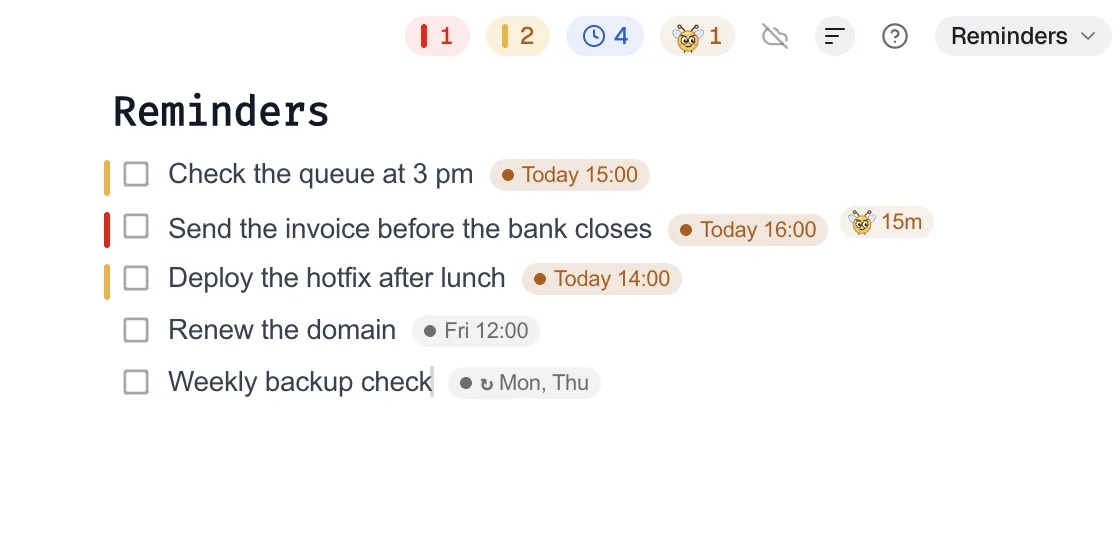
Deep work gets a deadline, not a nag
A focus block is a task like this:
{ "name": "add_item", "arguments": {
  "collection": "Job Board",
  "text": "TIMEBOX 2 h: fix the invoice rounding bug",
  "priority": 5, "due": "2026-10-14T1100", "pesky": null } }
The deadline label shows the end of the block. No Pesky, so nothing fires while I work.
Must-not-miss tasks get Pesky, timed to an edge
Pesky sends a desktop notification at a fixed interval until the task is done. It counts from the moment it is set, not from the deadline. So to land the first nudge at the end of my block, the agent sets the interval to the minutes until then:
{ "name": "add_item", "arguments": {
  "collection": "Job Board",
  "text": "Submit the conference talk proposal",
  "priority": 5, "due": "2026-10-14T1700", "pesky": 120 } }
Added at 11:00, the first nudge comes at 13:00, after the morning block, and every two hours after that until I complete it.
Small admin is batched
Replies, renewals and quick checks get one shared deadline in the early afternoon. I do them together, at one edge, instead of in ten breaks.
The OS can mute it all
Pesky uses the operating system's notification settings. When I turn on a macOS Focus mode, Pesky stays quiet too. When the screen is locked, it waits, then sends one notification per due task, not one per missed interval.
Today

Pesky
Fix checkout bug from #334
acme-shop
Call off Pesky
Rules for reminders that respect focus
- One repeating reminder per must-do task. Not per idea.
- Time the first nudge to an edge. Not to "now".
- Long intervals for slow tasks. Every 2 to 4 hours keeps a task in view without nagging.
- Deadlines for everything else. A label that turns amber, then red, is a quiet reminder.
- Complete tasks properly. In Focus Pad, ⌘-click (Ctrl-click) completes a task and stops Pesky. A normal click only selects it.
Related
- Pesky reminders: nagging that you control
- Eye break reminders that do not interrupt
- Buzz + Focus Pad MCP: how my Secretary agent runs my day
- Let your AI agent set reminders
References
- Mark, G., Gudith, D., & Klocke, U. (2008). The cost of interrupted work: More speed and stress. Proceedings of CHI 2008, 107–110. https://doi.org/10.1145/1357054.1357072
- Altmann, E. M., & Trafton, J. G. (2002). Memory for goals: An activation-based model. Cognitive Science, 26(1), 39–83. https://doi.org/10.1207/s15516709cog2601_2
- Czerwinski, M., Horvitz, E., & Wilhite, S. (2004). A diary study of task switching and interruptions. Proceedings of CHI 2004, 175–182. https://doi.org/10.1145/985692.985715
- Stothart, C., Mitchum, A., & Yehnert, C. (2015). The attentional cost of receiving a cell phone notification. Journal of Experimental Psychology: Human Perception and Performance, 41(4), 893–897. https://doi.org/10.1037/xhp0000100
- Iqbal, S. T., & Bailey, B. P. (2008). Effects of intelligent notification management on users and their tasks. Proceedings of CHI 2008, 93–102. https://doi.org/10.1145/1357054.1357070
- Perlow, L. A. (1999). The time famine: Toward a sociology of work time. Administrative Science Quarterly, 44(1), 57–81. https://doi.org/10.2307/2667031
FAQ
Frequently asked questions
Do notifications break concentration even if I ignore them?
They can. In one experiment, phone notifications that people did not answer still hurt performance on an attention-demanding task, by about as much as using the phone (Stothart et al., 2015).
When is the best time to get a reminder?
At a breakpoint, when you finish one part of a task. In a study by Iqbal and Bailey (2008), notifications held until a breakpoint caused less frustration and faster reactions than notifications delivered at once.
How many reminders should I have running?
As few as possible. Keep repeating reminders for tasks you must not miss, and use a deadline label for the rest.
Can an AI agent time my reminders?
It can choose when the first nudge comes and how often it repeats. With the Focus Pad MCP server, the agent sets a Pesky interval in minutes. Pesky counts from the moment the interval is set.
Do Pesky reminders respect macOS Focus modes?
Yes. Pesky uses the notification settings of your operating system, so Do Not Disturb and Focus modes stop Pesky notifications too.