
On this page
To resume one exact Claude Code session, run claude --resume <session-id> and do not use claude --continue, because --continue takes the most recent session, even one that is still open in another terminal. DevWorkspace Pro, a desktop app for macOS, Windows and Linux, also shows you which sessions are live, so you go back to the open tab and do not start the session a second time. It costs $9 a month, $95 a year or $499 once.
Say you have two terminals in one project, one on the API and one on the tests. You close nothing, open a third terminal and type claude --continue. You now have the most recent conversation, and it may be the one another terminal is still using. One developer reports that an agent "spent an hour doing workstream A's work" in the wrong tab this way.
See it for yourself
We tested this on Claude Code 2.1.318. We opened a session in one terminal and left it running. In a second terminal, in the same folder, we ran claude --continue with a short prompt.
Both processes had the same session ID, the second one wrote to the same session file, and it printed no warning. This issue was still open when we wrote this page. Claude Code changes often, so run the test on your own version if it matters to you.
Fix it in the terminal
Use the ID or a name, not "the most recent one":
| Command | What it does |
|---|---|
claude --resume <session-id> |
Opens that session |
claude --resume |
Opens a picker, so you select the session yourself |
claude -n api-refactor |
Starts a session with a name. You can then run claude --resume api-refactor |
claude --resume <session-id> --fork-session |
Continues the conversation under a new session ID, so the original stays as it was |
Please, note that --resume does not protect you if you select a session that is open somewhere else. You still have to know which ones are open. That is the part you cannot see from a plain terminal.
See what is live in DevWorkspace Pro
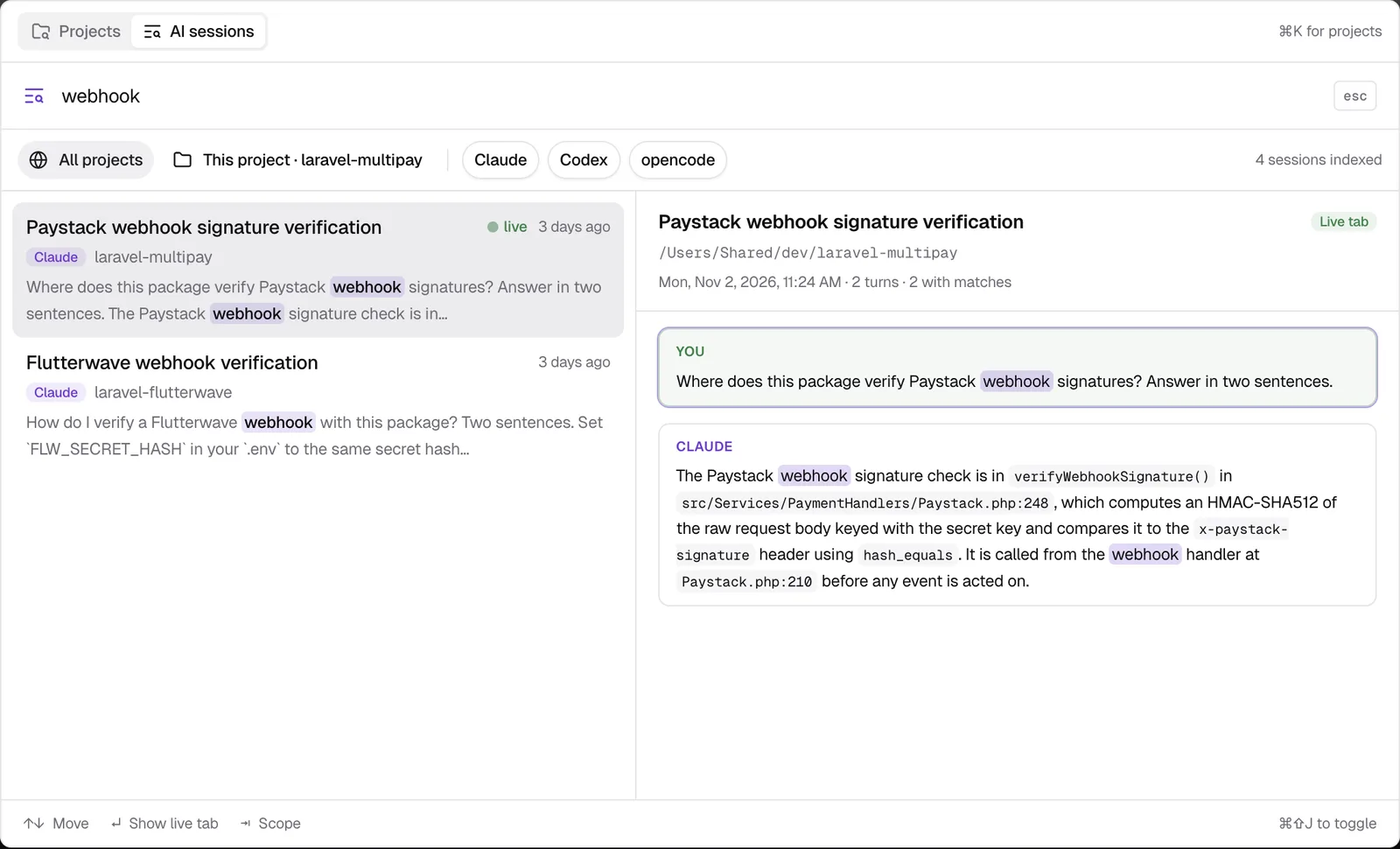
Press Cmd+Shift+J (Ctrl+Shift+J on Windows and Linux) and type a word from the session. A session that runs in an app tab shows a green live dot, and the footer tells you what Enter will do.
| Session | Enter does |
|---|---|
| Live in an app tab | Show live tab. The app brings up that tab, with no second process |
| Not running | Resume in new tab. The app runs claude --resume <id> in the folder of the session |
We tested both. Enter on a session that was not running opened a new tab with its session ID. A second Enter on the same session, now live, went back to that tab and opened nothing new.

The app also starts each New AI session with its own session ID, so it always knows which session belongs to which tab. If you want the full picture of the search, see Search Claude Code history. For the sessions left open when you quit, see Resume Claude Code sessions after a restart.
What this does not cover
- External terminals. The live dot covers sessions that run in DevWorkspace Pro tabs. A session open in another terminal shows no dot, and Enter can open it a second time.
--continuetyped by hand. The app does not stop you from typingclaude --continuein a terminal tab, and it does not save that session for resume.- The licence. AI session search needs an active licence.
Learn more
- AI Session Search in the docs
- Run multiple AI coding agents
- Pricing
FAQ
Frequently asked questions
Why did claude --continue open the wrong conversation?
claude --continue takes the most recent conversation. It does not know which terminal you were in. If you have two terminals in one folder, it can take the session that is still running in the other terminal.
How do I resume one exact Claude Code session?
Run claude --resume with the session ID. If you start a session with claude -n and a name, you can also resume it with that name.
What happens if two terminals write to one Claude Code session?
Both processes write to the same session file. In our test on Claude Code 2.1.318, the second process got the same session ID as the first one that was still open.
Does DevWorkspace Pro detect a session that I opened in another terminal?
No. It knows only the sessions that run in its own tabs. If you open the same session in an external terminal, the app does not see it.