
On this page
DevWorkspace Pro is a desktop app for macOS, Windows and Linux with a Scratchpad that runs PHP code inside your Laravel, Symfony, Drupal or WordPress project, with the framework fully booted. It costs $9 a month, $95 a year or $499 once.
So you can query your data, try an API or test a service without writing a route or a test first.
Run a snippet
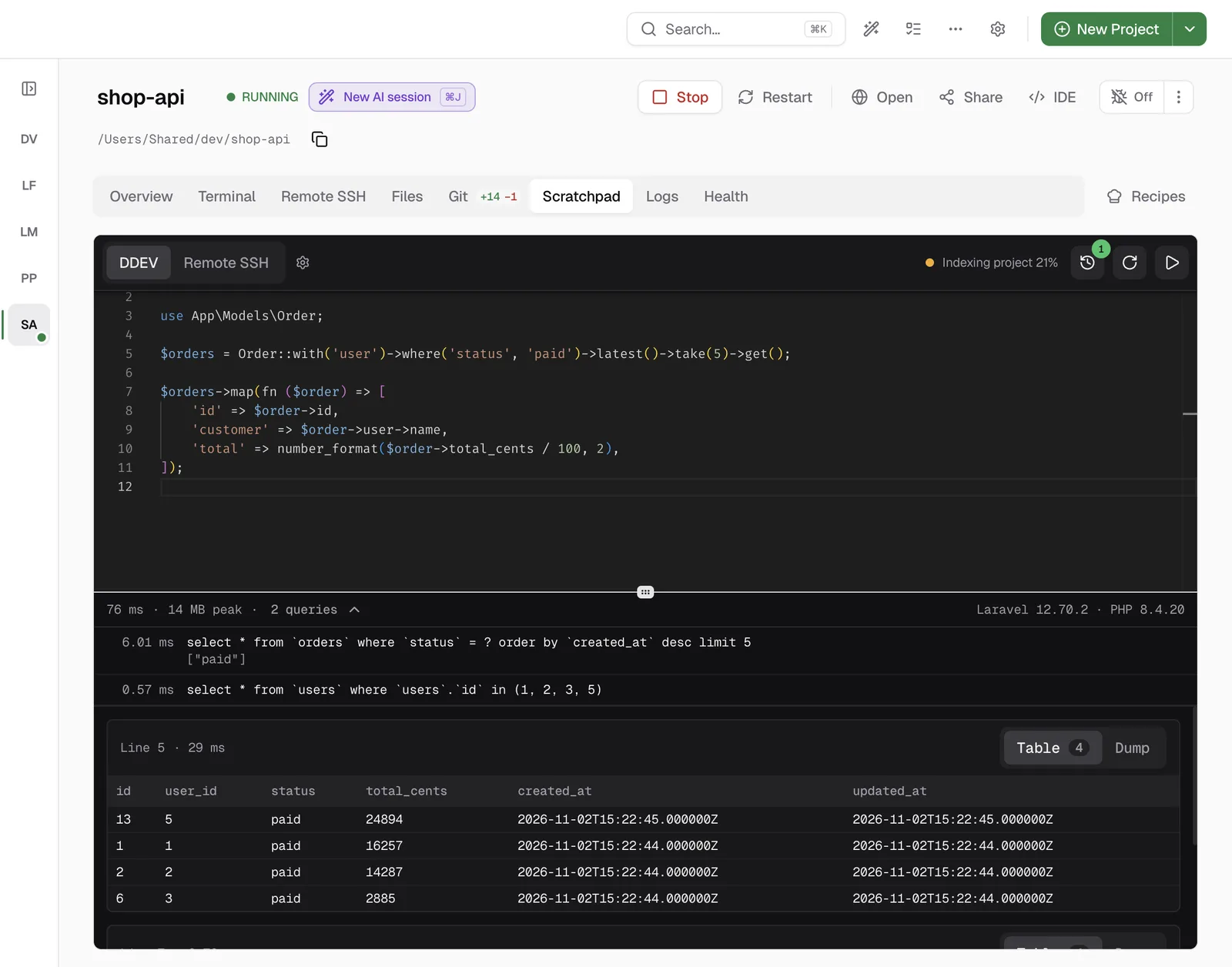
- Open the project and click the Scratchpad tab.
- Type your code. In a Laravel project, all helpers and facades are available, for example
DB::andUser::query(). - Press Cmd+Enter (Ctrl+Enter on Windows and Linux). This runs the selection or, if there is no selection, all the code.
When a statement fails, the run stops at that statement. The error shows in the output, and the editor marks the line.
What the output tells you
The bar above the output shows the run time, the peak memory, the framework version and the PHP version. It also shows the number of database queries. Click the number to see each query with its bindings and time. If the same query runs many times with different values, you see Possible N+1.
Each statement that returns a value has its own card. When it returns a list of rows, you can read it as a Table or as a Dump.
Why the second run is fast
On DDEV, the first run starts a PHP process in your web container and boots your framework. Later runs use the same process, so they start in a few milliseconds and your variables stay available. You can load a model in one run and use it in the next. When you change code in your project, the Scratchpad starts a new process by itself.
Completion that knows your app
The editor reads your project. In a Laravel project it completes model columns with their cast types, relations, scopes and query builder chains. After a run, it also knows the real values in your variables, so $user-> lists the actual attributes.
Run it on your server
The Scratchpad can also run your code on a remote server through SSH. Please, note that this is your real server and your real data, so read your code twice before you run anything that writes.
Learn more
- Scratchpad in the docs has every shortcut and setting.
- Pricing
FAQ
Frequently asked questions
How do I run Laravel code snippets outside tinker?
Open the project in DevWorkspace Pro, open the Scratchpad tab, type your code and press Cmd+Enter (Ctrl+Enter on Windows and Linux). The code runs in your DDEV container with Laravel fully booted.
Does the Scratchpad work for projects that do not run in DDEV?
The code runner works in DDEV projects, and on a remote server through SSH. For other projects, the Scratchpad tab is a notes pad.
Can I run a snippet on my server?
Yes. Set up a Remote SSH connection, switch the Scratchpad to Remote SSH and run your code. Each remote run starts a new PHP process, so be careful with code that writes data.